

Imagine you wake up one morning. Your friends are messaging you confused about a strange link you sent them last night. You never sent it. This is not a story it is happening to WhatsApp users every single day.
All it takes is one code or one fake message and a hacker can take over your WhatsApp account. Your private messages, photos, contacts and even your identity are suddenly in danger. The good news is that keeping your WhatsApp account safe is not hard.
In this guide we will show you how to secure whatsapp account step-by-step. From turning on two-step verification to recognizing messages, here is everything you need to know.
Table of Contents
Why WhatsApp Accounts Are Hacked: Why You Should Care

Before we go into the solutions it helps to know how hackers actually get in. Most WhatsApp hacks do not happen because of some high-tech trick. They happen because of mistakes people make every day.Knowing these methods can help you secure whatsapp account and avoid common security risks. Here are the common ways WhatsApp accounts are taken over:
1. OTP Scams:
A hacker who has your phone number will try to register your number on their phone. WhatsApp then sends a 6-digit code to your phone. The hacker pretending to be a courier or a friend tricks you into giving them that code. Once they have it your WhatsApp account is theirs. You are logged out immediately.
2. Fake Links and Scam Messages:
You have probably seen messages like “You’ve won an iPhone! Click here to claim.” These links often take you to fake WhatsApp login pages that steal your information. They install malware on your device.
3. WhatsApp Web Left Open:
If you have ever used WhatsApp Web on a shared computer and forgot to log out anyone with access to that device can read your messages. Or worse use your WhatsApp account to trick your contacts.
4. SIM Swapping:
In attacks hackers trick your phone company into giving them a new SIM card that has your number. Once they have your number they can get the code. Take over your WhatsApp account completely.
5. Old App Versions:
Older versions of WhatsApp sometimes have security problems that have already been fixed in versions. Hackers look for users with versions to take advantage of.
Here’s why this is important: once your WhatsApp account is taken, knowing how to secure whatsapp account becomes critical because the damage does not stop at losing access. Hackers can trick your friends and family using your identity see photos and messages and even use your WhatsApp account to spread malware.
Getting your WhatsApp account back can take days or longer. If you want to understand the bigger picture of how hackers target phones in general, check out our guide on how to protect your phone from hackers.”
How to Secure Your WhatsApp Account: Step-by-Step:
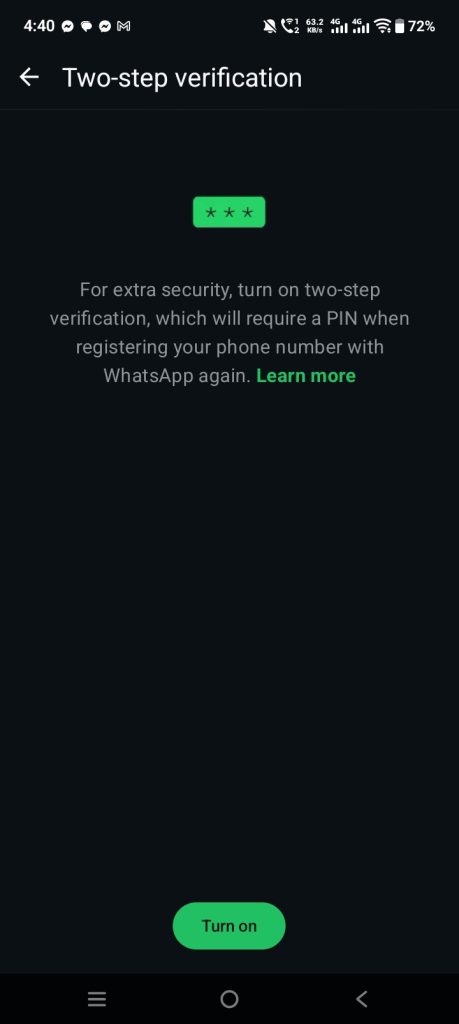
Step 1: Turn On Two-Step Verification To Secure Whatsapp Account
This is a security feature that WhatsApp offers yet many people never use it. Two-step verification adds a 6-digit code on top of the code. So even if a hacker gets the code they still cannot access your WhatsApp account without the code one that only you know.
How to turn it on:
1. Open WhatsApp. Go to Settings
2. Tap Account → Two-step verification
3. Tap. Set a 6-digit code
4. Add an email address as a backup (this is very important it helps you get your code back if you forget it)
Once this is on no one can use your number on a device without entering your code even if they have a valid code.This simple security step can help you secure whatsapp account against common takeover attempts. For more details, check WhatsApp official two-step verification guide.
Step 2: Never Give Your Code to Anyone
This seems simple. Scammers can be very convincing. They often say they are from WhatsApp, a delivery company or even someone you know asking you to “confirm” a code they say they sent by mistake. Remember this rule: WhatsApp will never ask you to give your code to anyone not through a call a message or an email. If someone asks for your code it’s a scam, no exceptions.
Step 3: Check Your Active Sessions
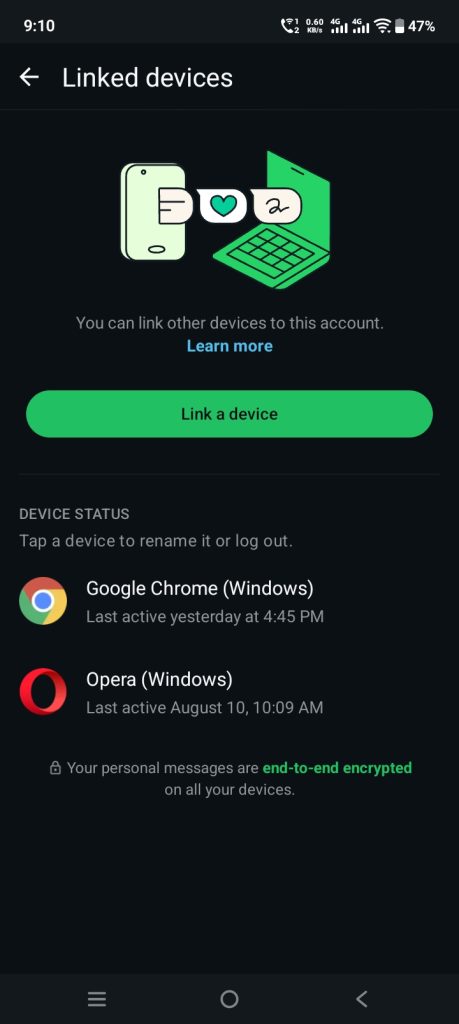
Many people do not know that WhatsApp lets you see every device that is connected to your WhatsApp account.
How to check:
1. Go to Settings → Linked Devices
2. Look at the list of sessions
3. If you see a device you do not recognize tap on it. Select Log Out
Make this a habit. Checking once a week takes than 30 seconds and can catch unauthorized access early.
Step 4: Learn to Recognize Scam Links
Before You Click
Scam messages have become very convincing. There are some signs that always give them away. Watch for:
1. Messages that say you’ve won something you never entered for
2. Links that use URLs (like bit.ly) that hide where they go
3. Urgent messages like “Act ! Your account will be blocked in 24 hours!”
4. Messages from numbers with greetings like “Hi Dear Customer”
5. Login pages that look like WhatsApp but have a different address
A simple rule to follow: if a message makes you feel nervous or excited and pushes you to click right away slow down. Real companies do not work that way. If you’re not sure do not click. Instead search the offer or company name to check if it’s real. If you already clicked a link change your two-step verification code away and avoid entering any personal information on the page that opened.
Step 5: Always Log Out of WhatsApp Web When You’re Done
If you use WhatsApp Web on a computer, office system or a friends laptop make it a habit to log out when you are done. Not just close the browser tab. Closing the tab does not end the session. Your WhatsApp account stays logged in on that device until you log out from your phone or the browser.
To log out remotely:
1. Open WhatsApp on your phone
2. Go to Settings → Linked Devices
3. Tap the device you want to remove and select Log Out
For safety avoid using WhatsApp Web on shared or public devices unless you really have to.
Step 6: Keep Your App and Phone Up to Date
Apps are targets for hackers because known problems are already known. WhatsApp regularly updates with security fixes. They only protect you if you install them.
Best ways to do this:
1. Turn on updates for WhatsApp from the app store
2. Keep your phones operating system updated well since old versions can also be hacked
3. Avoid downloading WhatsApp from sites. Always use the app store
Step 7: Be Careful With Backup Settings
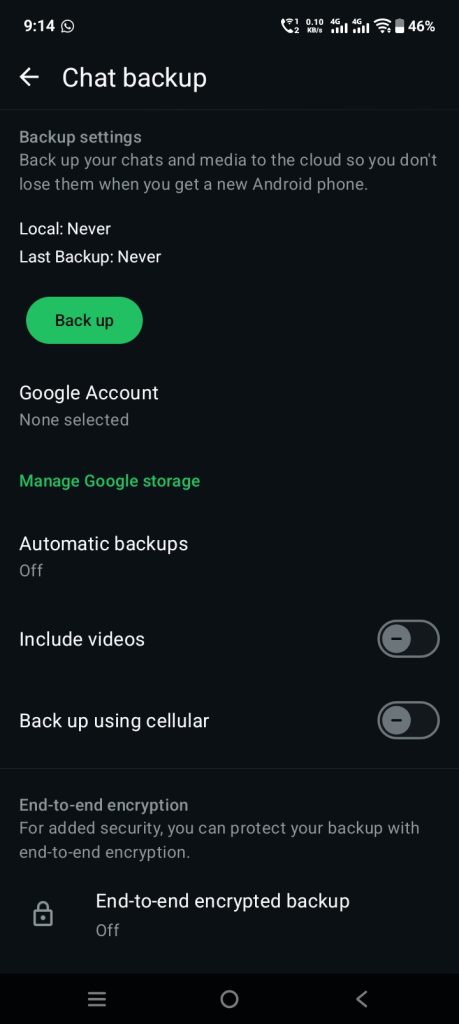
Most people do not realize that WhatsApp chat backups (stored on Google Drive or iCloud) are not end-to-end encrypted unless you turn it on.
How to secure your backup:
1. Go to Settings → Chats → Chat Backup
2. Tap End-to-end encrypted backup
3. Turn it on. Set a password or save the 64-digit code safe
Without this anyone who gets into your Google or I Cloud account could read your messages. You can learn more directly from WhatsApp end-to-end encrypted backup support page.
Step 8: Set a Strong Lock on Your Phone
This might not seem related to WhatsApp. It is one of the ignored security steps. If someone gets hold of your phone none of your WhatsApp settings matter. Use a code, fingerprint or face lock.. Turn on Fingerprint Lock or Face Lock inside WhatsApps privacy settings for extra protection.
What to Do If Your WhatsApp Is Already Hacked
If you think your WhatsApp account is already taken act quickly. And if you’re unsure whether the hack started somewhere else on your phone, our detailed guide on signs your phone is hacked can help you confirm it and fix the root issue.
1. Open WhatsApp on your phone and re-verify your number with the code. This will log the hacker out
2. Enable two-step verification with a code right away
3. Tell your contacts that your WhatsApp account was taken so they do not fall for messages sent in your name
4. Use WhatsApps support if you cannot get back in
Conclusion:
Your WhatsApp account has some of your private messages, photos and connections.. Protecting it should not be ignored. As we have seen most hacks do not come from high-tech tricks; they come from mistakes like sharing a code or ignoring a notification.
By turning on two-step verification being careful, with phishing links checking linked devices and keeping your app updated you can make your WhatsApp account harder to break into. Security is not something you do once. It is something you do every day.
Take five minutes today to go through these steps. That small effort now could save you from stress, embarrassment and loss later. Stay alert stay updated and keep your WhatsApp account yours.
